

Why not just embed YouTube?
The usual way to show YouTube videos on a WordPress site is to paste a link and let WordPress embed the player. It works – but every embed loads YouTube’s player and its scripts as soon as the page opens, even if nobody watches. That makes pages slower, it sends your visitors’ data to Google before they agreed to anything, and it looks the same on every website. And when you upload a new video, you have to add it by hand.
Screenroom is a WordPress YouTube gallery plugin built the other way round. It shows your videos as a designed gallery – a slider, a player with playlist, a grid, a Shorts wall or a list – with thumbnails from your own server. YouTube’s player loads only when a visitor clicks play. New uploads of your channel appear by themselves. And you need no API key and no Google account.
Your first gallery in two minutes
- Install Screenroom under Plugins → Add New and activate it.
- Open Screenroom → New gallery. The studio opens in full screen.
- Paste your channel (its address or @handle), a playlist link, or the links of single videos.
- Pick a layout and your colour – the preview shows it at once.
- Place it: add the “Screenroom” block to a page, or paste the shortcode, for example
[devenzi_video gallery="home"].
Everything is saved as you go. Change the gallery once and it changes everywhere it is used.
Channels, playlists, Shorts
A gallery gets its videos from one of three places. A channel always shows the newest uploads – only videos, only Shorts, or both. A playlist can be any public playlist, also from other channels. Your own selection is a list of video links in the order you like; Shorts links work too, and a link with a start time (“&t=90s”) starts there.
New videos are fetched in the background, so a page never waits for YouTube. Filter by words in the title (“only titles with ‘tutorial’”, “without ‘live’”), hide single videos, and choose the order: as in the source, newest or oldest first, A–Z, most viewed or random.
The free version reads YouTube’s public feeds, which carry the 15 newest videos of a channel or playlist. With Pro and your own free API key a gallery shows up to 200 videos – with their length and views.
The layouts
Slider
Cards in a row to swipe through, with arrows, a progress line and the keyboard. It loops endlessly and can move on by itself, pausing as soon as someone points at it.
Player with playlist
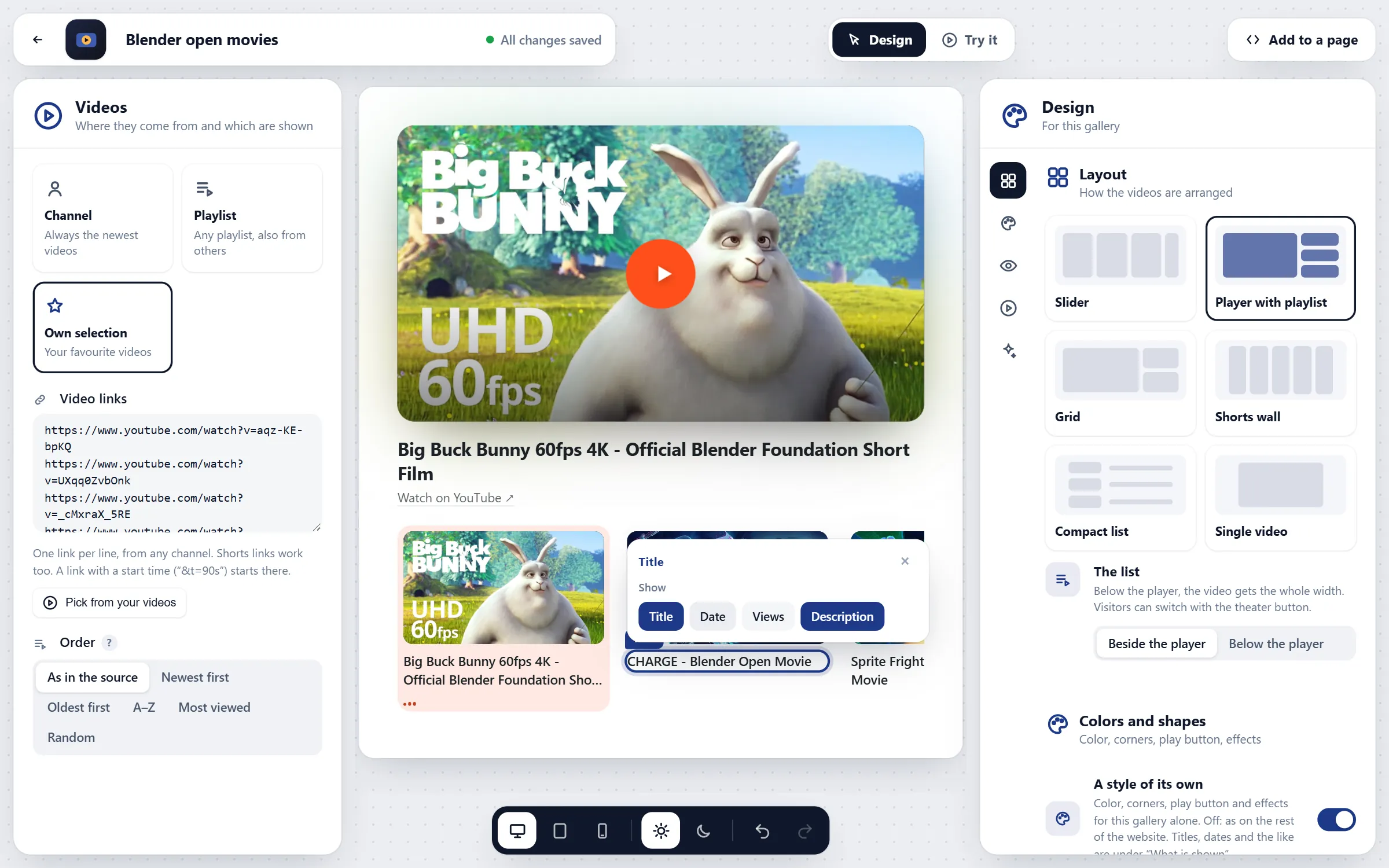
One big player with the list of videos beside it or below it. A theater button pulls the player to full width; the description shows under the video, links clickable, and the next video can start on its own.
Grid
All videos at a glance. A click plays the video in its card, opens it large right below its row – the other cards make room – or in a lightbox.
Shorts wall and stories
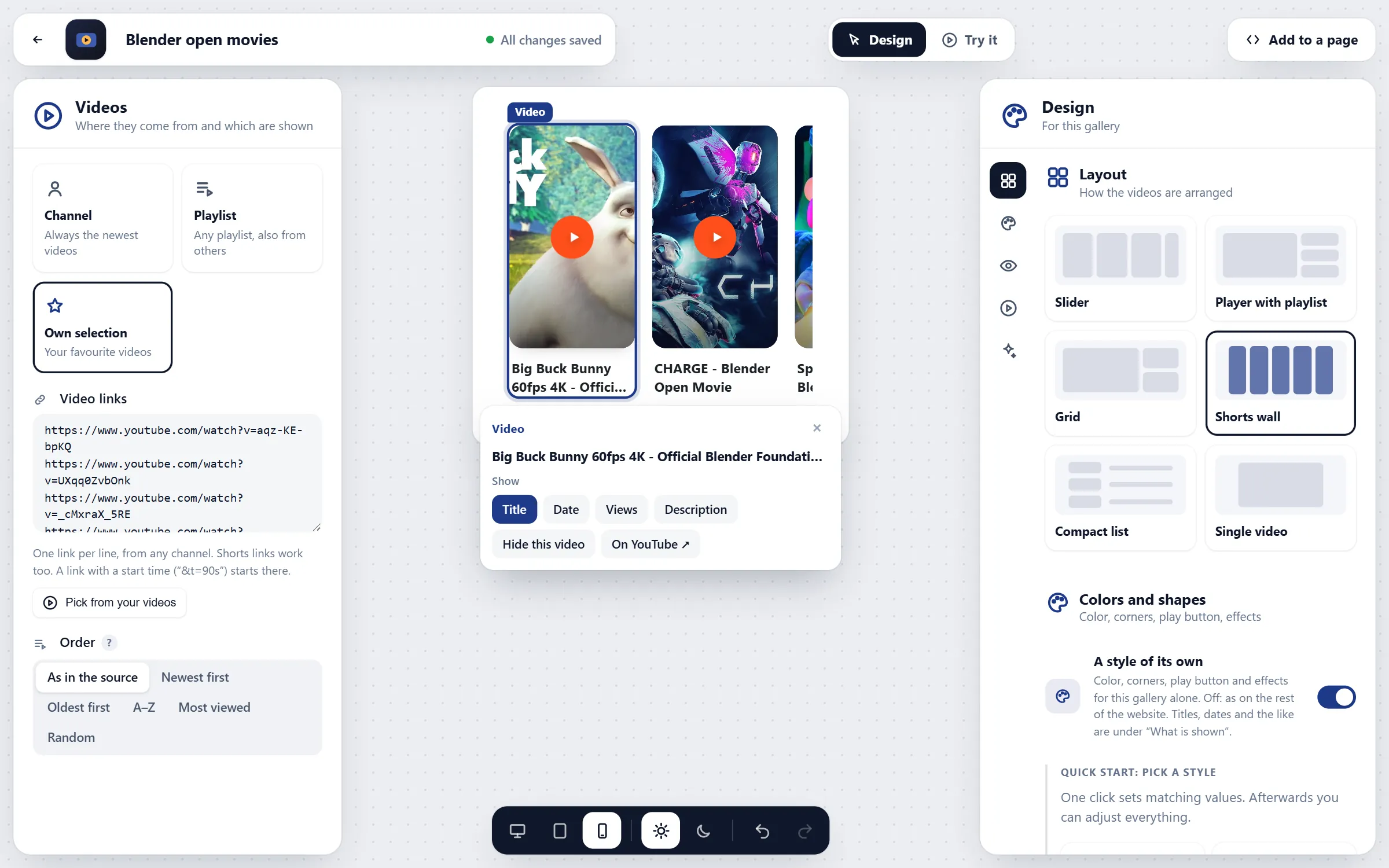
Upright 9:16 cards for YouTube Shorts; on phones they become a row to swipe. Stories (Pro) show round bubbles; a tap plays the Shorts upright, one after the other.
Compact list
A small picture, the title, the start of the description and the date in rows – easy to read for long archives of sermons, talks, lessons and podcast episodes.
Single video
One video on its own, privacy-friendly and fast – a better replacement for a plain YouTube embed.
Pro layouts
Coverflow (a 3D carousel), bento (one big tile and smaller ones, for home pages), spotlight (a dark cinema stage), stories and the testimonial wall with quote, name, company and stars next to each video.
The studio
Most gallery plugins are long settings pages with a small preview. Screenroom opens every gallery in a full-screen studio: where the videos come from on the left, the design on the right, your gallery in the middle at its real size.
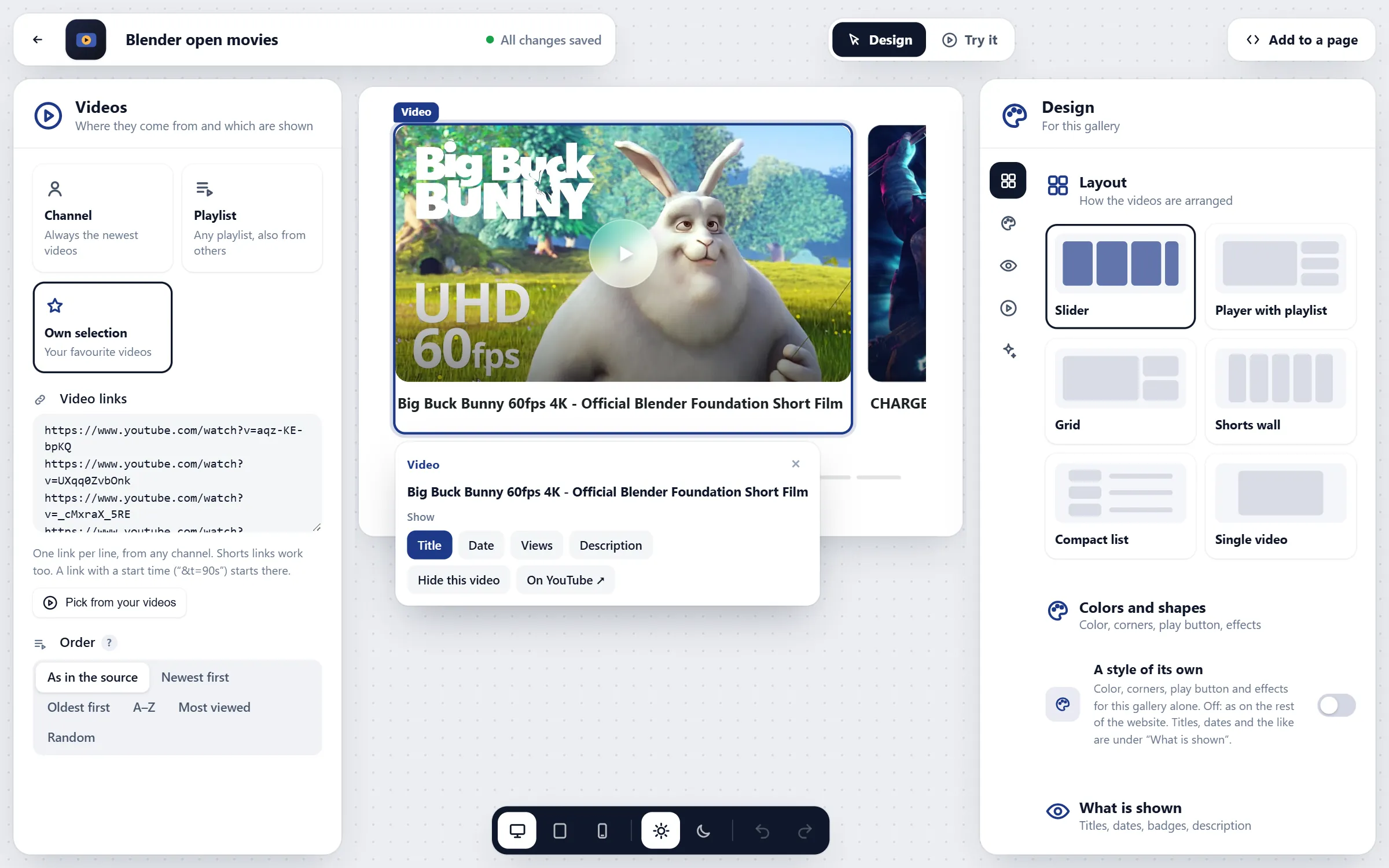
- Click in the preview to select a video, a title, the play button or the arrows; a small bar opens with what belongs to it.
- Try it switches the preview to how visitors use it – play, swipe, open.
- Devices: computer, tablet and phone, on a light or dark website.
- Undo and redo for everything, with Ctrl+Z and Ctrl+Y; P switches between designing and trying, 1–3 the devices.
- Panels you can drag wider or narrower; the studio remembers.
Design
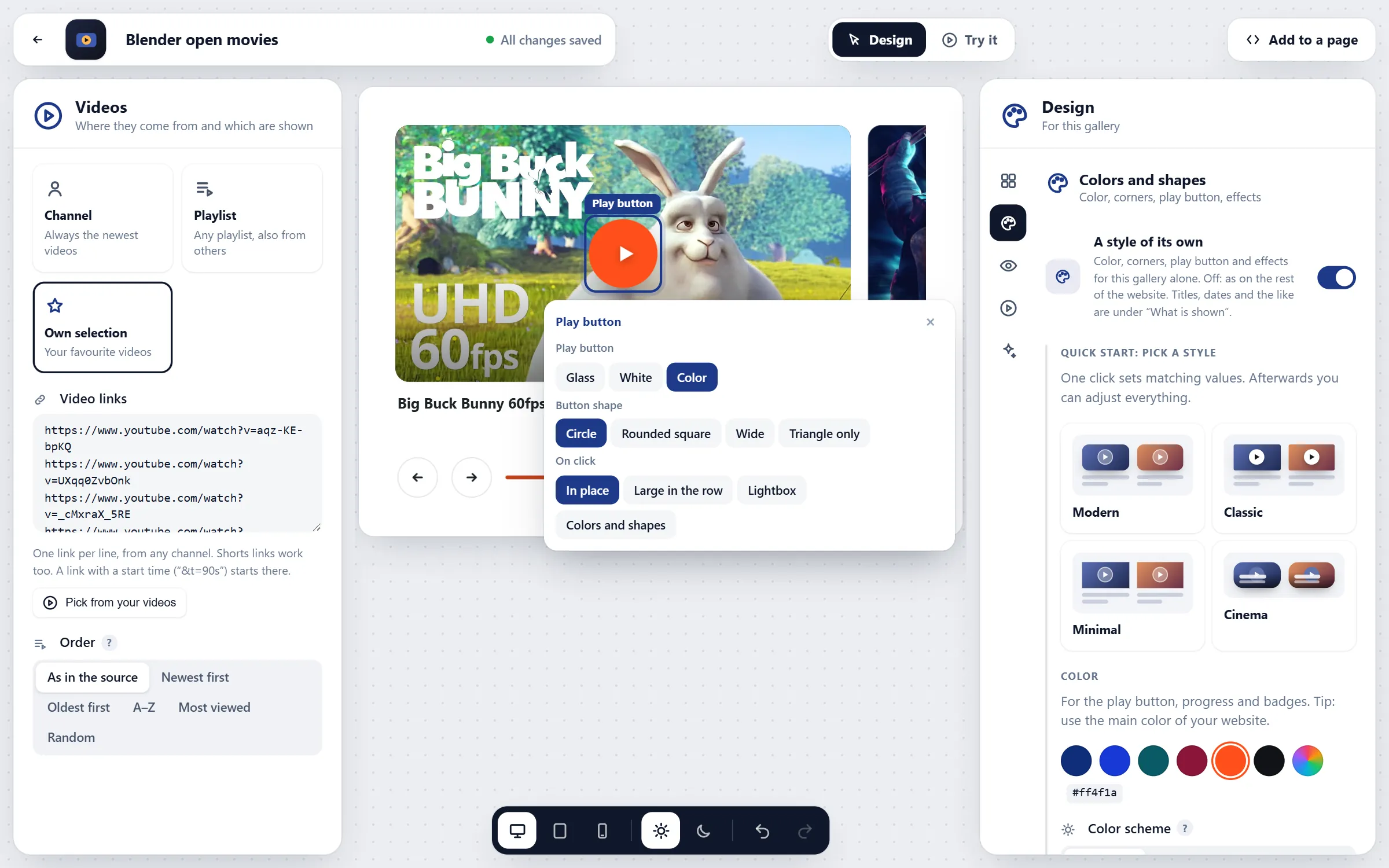
Start from a style – Modern (soft corners, glass play button), Classic, Minimal or Cinema (title on the image) – and change anything: your colour, the corners, the space between videos, the image format (16:9, 4:3, 1:1, 9:16), the size of the cards, the title below or on the image, the play button (glass, white or colour; circle, rounded square, wide or just the triangle), the hover effect, a shadow and the ambient glow.
That style is your website style, shared by all galleries. Any gallery can have a style of its own instead – handy for a landing page or for agencies with several brands. In CSS you can fine-tune everything with custom properties like --vsfy-accent and --vsfy-radius.
On your pages: block, shortcode, Elementor, Divi
In the block editor, add the “Screenroom” block and pick a gallery. “Edit in the studio” opens the studio right over your page; “Done” saves and shows the new gallery in the block. For one spot only you can change the layout or the number of videos without touching the gallery.
Everywhere else – classic themes, widgets, page builders – paste the shortcode. Pro adds a native Elementor widget and a Divi module.
Privacy and GDPR
A YouTube player sends data such as the IP address to Google. Screenroom makes sure that happens only when a visitor wants to watch:
- Thumbnails from your server: the pictures are stored on your website, so opening the page sends nothing to Google.
- Player after the click, from youtube-nocookie.com, YouTube’s privacy-enhanced mode.
- Consent first, if you like: a short notice with “Play video” and “Always play YouTube videos” – remembered without a cookie.
- Your cookie banner decides: Borlabs Cookie, Complianz, Cookiebot, Real Cookie Banner, Usercentrics, CookieYes and Klaro are understood.
The privacy page in the admin explains what loads when and suggests a text for your privacy policy. This is not legal advice.
The galleries on this page work the same way: the pictures come from devenzi.com, and the counter above shows when YouTube is asked – only after you press play.
Speed and accessibility
The plugin’s script is about 14 KB compressed and loads only on pages with a gallery. Thumbnails are sized for the screen and load lazily. Because YouTube’s player waits for the click, a page with twenty videos is as fast as a page with pictures.
Every play button is a real button with a label, galleries work with the keyboard (arrow keys, Home and End), focus is always visible, and animations calm down when the visitor’s system asks for reduced motion.
Plays on your site are real plays in YouTube’s player, so YouTube counts them as views. If the player shows “Error 153”, a theme or security plugin is blocking the referrer – the status page in the admin checks this and explains the fix.
Screenroom Pro in detail
More videos, more sources
Up to 200 videos per gallery with your own free API key, including length and views. Mix several channels into one gallery, fill smart galleries by rules from your video library, and show galleries side by side as tabs.
Layouts that sell
Coverflow, bento, spotlight, stories and the testimonial wall. An end card replaces YouTube’s suggestions when a video ends: your button (“Book a call”), “Watch again” and “Next”.
Courses
Chapters from the video description become a list next to the player. Course mode ticks off watched lessons, shows the progress and offers “Continue with lesson 4” – stored in the visitor’s browser, without a cookie.
Archives and media libraries
A search field above the videos, “Show more” instead of endless pages, playlists as a shelf with a link to every video, and live streams and premieres put first with a countdown.
Reach and numbers
Video SEO adds structured data so search engines understand your videos. Click statistics show which videos get played – without cookies. The mini player keeps a video running in a corner while visitors scroll.
Who uses Screenroom for what
- Creators, musicians and podcasters: the channel always up to date, Shorts wall, live streams first.
- Coaches and schools: player with playlist, chapters and course mode.
- Shops, agencies and services: testimonial wall, end card with a button, statistics.
- Churches, universities and conferences: compact list, search, media library.
- Launches, bands and events: spotlight, coverflow, ambient glow.
- Agencies and networks: several channels, a style per client, editors who may help.