
WP Maps alternative – an honest comparison
WP Maps by Flipper Code packs a lot into its free version: several map providers, listings with filters and blocks for many page builders. If you are looking for something different, here is where Map Studio, our own plugin, takes another path, and where WP Maps is the better choice.
- Stay with WP Maps if you want to show posts or ACF fields on a map, need large listings with sorting and pagination, or want Google Maps.
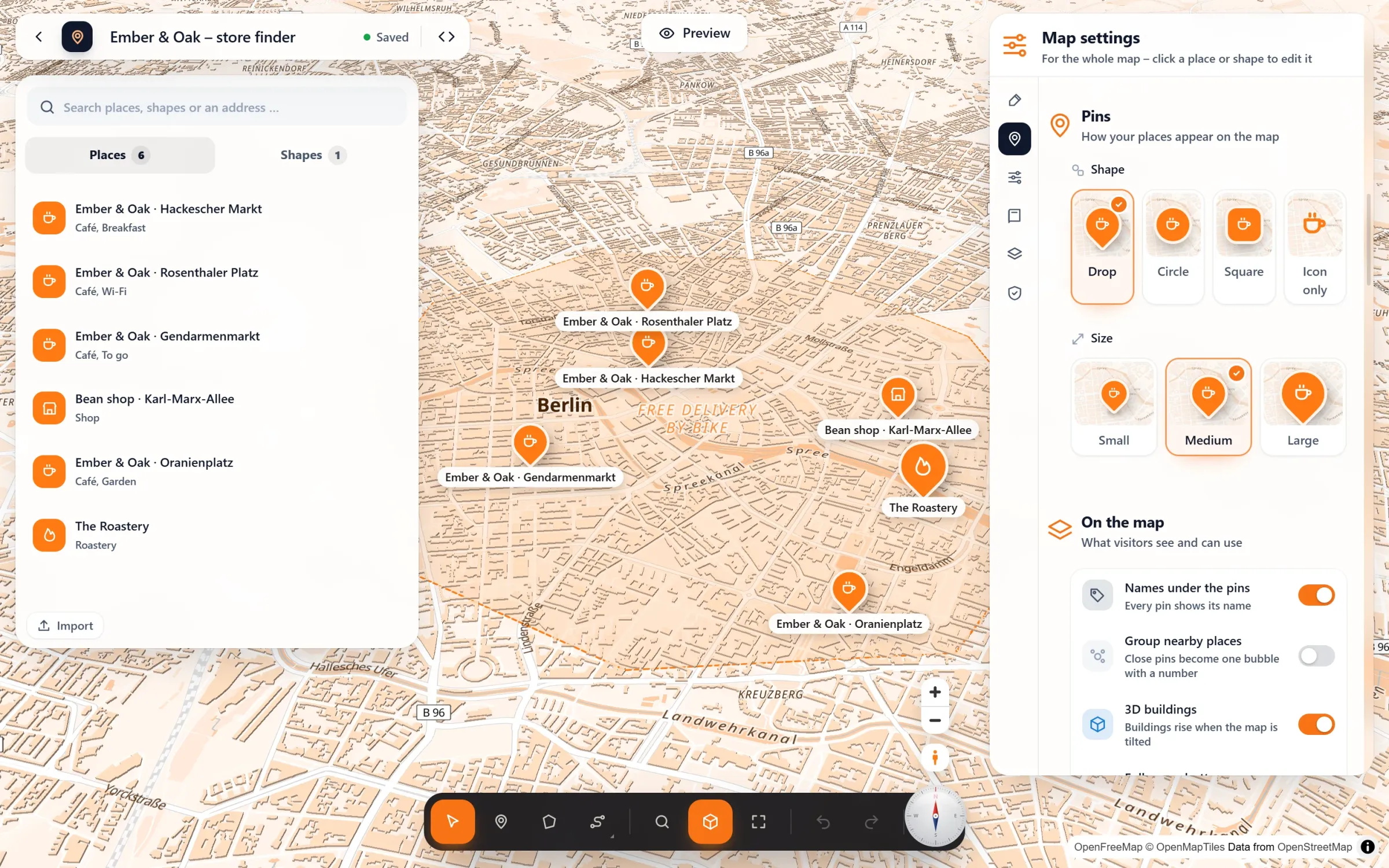
- Try Map Studio if you want to design the map visually, like vector maps with 3D buildings, and want popups with photos and opening hours and routes along real roads in the free version. Your maps come over in one click, and your pages keep working.
What WP Maps does well
According to its plugin page, the free version (as of November 2026) offers:
- Google Maps, OpenStreetMap or Mapbox as the map provider, and you can switch between them;
- several maps with as many locations as you need;
- listings below the map with search, filters, sorting and pagination;
- marker categories with their own icons, and marker clustering;
- circles, rectangles, polygons and lines, plus KML/KMZ and GeoJSON layers;
- blocks for the block editor, Elementor and Divi with a live preview.
The Pro version adds, among other things, posts and ACF fields on the map, a radius filter, routes between locations and directions through Google’s Directions API. With over 60,000 active installs and a 4.3 rating on WordPress.org, it is a widely used choice, especially for directories.
Where Map Studio is different
| WP Maps (free, per plugin page) | Map Studio (free) | |
|---|---|---|
| Editing | Settings pages and location forms in the admin, with a live preview | Full-screen editor: click a place and change it right on the map |
| Maps | Google Maps, OpenStreetMap, Mapbox | OpenStreetMap as vector maps: rotate, tilt, 3D buildings, light and sky |
| Look | Colour schemes, Snazzy Maps styles, custom CSS | Six map styles and your brand colour for map, pins and areas |
| Popups | Info windows filled from placeholders | Text, photos, opening hours and buttons, designed on the map |
| List of places | Listings with search, filters, sorting and pagination | List with search, category filter, “open now” and “Near me”, from the visitor’s location or a town or postcode they type |
| Routes | Lines you draw and a link to Google Maps for directions; routes between locations in Pro | Routes along real roads by car, bike or on foot, with lengths, without a key |
| Content from your site | Posts, custom post types and ACF fields in Pro | Places you add or import from CSV, KML or GeoJSON |
| Privacy | A GDPR option for Google Maps | Load after click, works with Complianz, Borlabs Cookie and Real Cookie Banner |
| Switching | – | Brings WP Maps maps over in one click; its [put_wpgm] shortcodes and blocks then show the new maps |
The WP Maps column is based on its WordPress.org page as of 11 November 2026. Features change; check the plugin page for the current state.
Where WP Maps is the better choice
- Directories built from your content: posts, custom post types and ACF fields on the map, with filters made from them (Pro).
- Big listings: list and grid layouts, sorting, pagination and a radius filter (Pro).
- Google Maps or Divi: Google as the map provider, and a Divi block with a live preview.
Own Google map styles, own marker icons, heatmaps and routes from Google’s directions don’t come over. Before you bring a map over, Map Studio lists what stays behind. Map Studio is new. We think it is the nicer way to make a map, but it does not have the years of development behind WP Maps yet. For more options, see WordPress map plugins compared.
Switching to Map Studio
- Install Map Studio next to WP Maps; both can stay active while you switch.
- Open Map Studio → Maps: it lists your WP Maps maps with their places, shapes and the pages they are on. Tick the ones you want and click “Bring the ticked maps over”. Places come with their text, picture, address, link and categories, and so do circles, rectangles, polygons and lines. A map that showed a listing gets Map Studio’s list of places.
- Give the maps your look: style, colours, icons, popups.
- Deactivate WP Maps. Your pages need no changes: its
[put_wpgm]shortcodes and blocks now show the maps brought over. Activate it again, and everything is as before.
Try Map Studio – free
Install it next to your current plugin and compare. No account, no API key.