
WordPress map plugins compared
The WordPress plugin directory has dozens of map plugins. Here are six well-known ones side by side: which maps they use, how you work with them and who they suit. Map Studio is our own plugin, and we say so up front.
- Lots of features, huge user base: WP Go Maps or WP Maps.
- Simple, no API key: MapPress with OpenStreetMap.
- Lightweight, shortcode-based: Leaflet Map or OSM.
- Design the map instead of configuring it, with vector maps, 3D and privacy built in: Map Studio.
- Mainly a store locator? See store locators for WordPress.
What matters in a map plugin
- Map provider: Google Maps needs an API key with a billing account and sends data to Google. OpenStreetMap maps are available without a key, depending on the tile service. See Google Maps API alternatives.
- Editing: shortcodes with parameters, settings pages, or an editor right on the map.
- Privacy: does the map wait for consent? Does the plugin work with your consent tool?
- What you need: one marker, many places with a list and filters, areas, routes, GPX.
- Upkeep: check how often it is updated and how many people use and rate it.
The six plugins at a glance
| Plugin | Active installs | Rating | Maps (per plugin page) | Focus (per plugin page) |
|---|---|---|---|---|
| WP Go Maps | 300,000+ | 4.8 / 5 | Google Maps, Leaflet, OpenLayers and several tile services | Custom maps, block, store locator, widget |
| WP Maps | 60,000+ | 4.3 / 5 | Google Maps, OpenStreetMap, Mapbox | Markers, filters, searchable listings, store locator |
| MapPress | 30,000+ | 4.7 / 5 | Google Maps, OpenStreetMap, Mapbox | Unlimited maps and markers, no API key needed, map blocks |
| Leaflet Map | 30,000+ | 4.9 / 5 | OpenStreetMap via Leaflet | Maps and markers with shortcodes |
| OSM – OpenStreetMap | 10,000+ | 4.6 / 5 | OpenStreetMap | Maps in posts and widgets, GPX, KML |
| Map Studio | new (since Nov 2026) | none yet | OpenStreetMap (OpenFreeMap), vector maps | Editor on the map, 3D, store finder, routes, load after click |
As of 9 November 2026. Installs, ratings and descriptions are taken from the plugins’ pages on WordPress.org. Features and Pro pricing change, so check each plugin page before you decide. How much each one makes a page load: map plugins tested.
The plugins one by one
WP Go Maps
The most used map plugin in the directory. It works with Google Maps as well as Leaflet and OpenLayers with several tile services, and includes a store locator, a block, an Elementor integration and a widget. With so many users there are lots of tutorials and answers around. If you want a proven all-rounder, start here. See also WP Go Maps alternative.
WP Maps
Works with Google Maps, OpenStreetMap and Mapbox, with filters, searchable listings and a store locator. It suits sites that show many places with filters and want to choose between providers. See also WP Maps alternative.
MapPress
Promises unlimited maps and markers without an API key and comes with map blocks for the block editor. Handy when you want to drop maps into posts quickly and without a key.
Leaflet Map
Lightweight and very well rated: maps and markers are made with shortcodes. If you are comfortable with those and want something lean, it is a sensible choice.
OSM – OpenStreetMap
A long-standing OpenStreetMap plugin with GPX and KML support. Travel and hiking blogs with tracks are where it fits best.
Map Studio
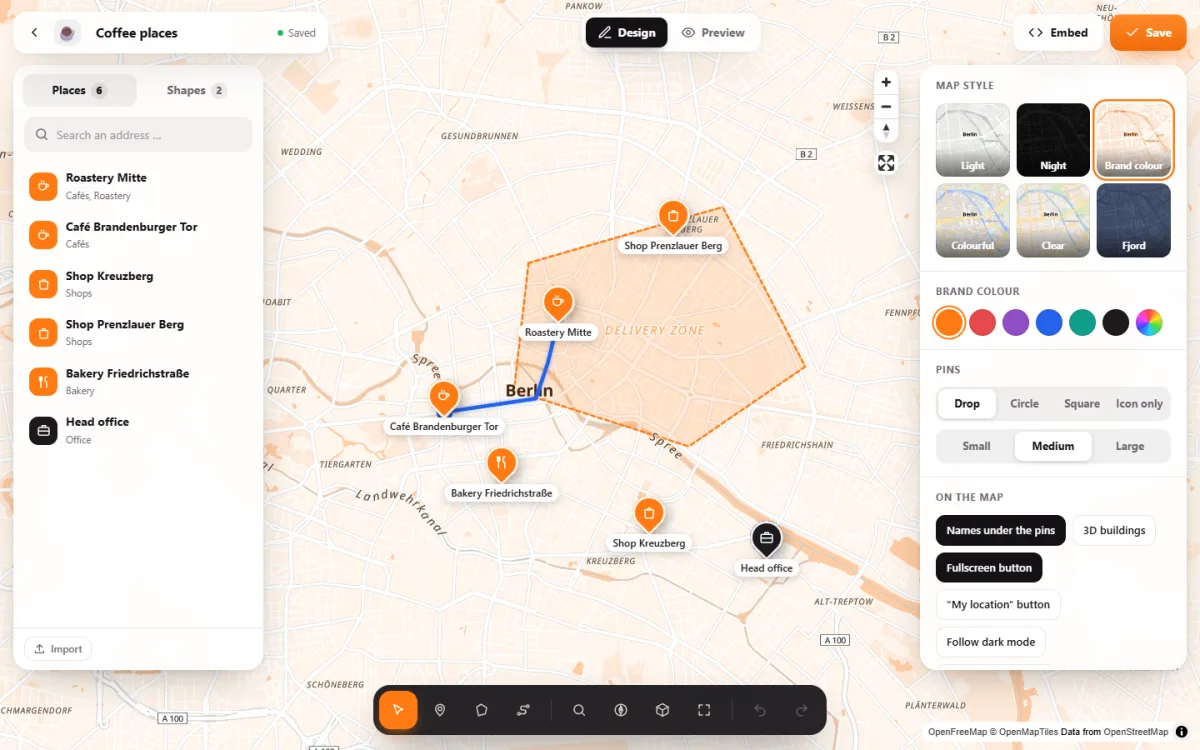
Our plugin, and the youngest on this list. Instead of settings pages there is a full-screen editor: click a place and change it right on the map. The maps are vector maps, sharp on every screen, with rotating, tilting and 3D buildings. It adds a store finder with opening hours, routes along real roads, load after click and support for Complianz, Borlabs Cookie and Real Cookie Banner. It needs no API key and no account. Choose it when the look of the map matters and it should match your brand.
To be fair: Map Studio is new. The others have more users and reviews to show, and more add-ons.
Which plugin fits you?
- Just your address on the contact page: any of them will do. Mind the privacy side, see How to add a map to your website.
- You want Google Maps no matter what: WP Go Maps, WP Maps or MapPress.
- No Google, quick shortcodes: Leaflet Map or OSM.
- No Google, your own look and a visual editor: Map Studio.
- Mostly a store locator with radius search: see store locators for WordPress.
Try Map Studio – free
Install, open, design. No account, no API key.