
WP Store Locator alternative – an honest comparison
WP Store Locator by Tijmen Smit is a dedicated store locator, well rated and now running on free OpenStreetMap maps out of the box. If you are looking for something different, here is where Map Studio, our own plugin, takes another path, and where WP Store Locator is the better choice.
- Stay with WP Store Locator if you need a radius search over hundreds or thousands of locations, a page for every location, or your own fields.
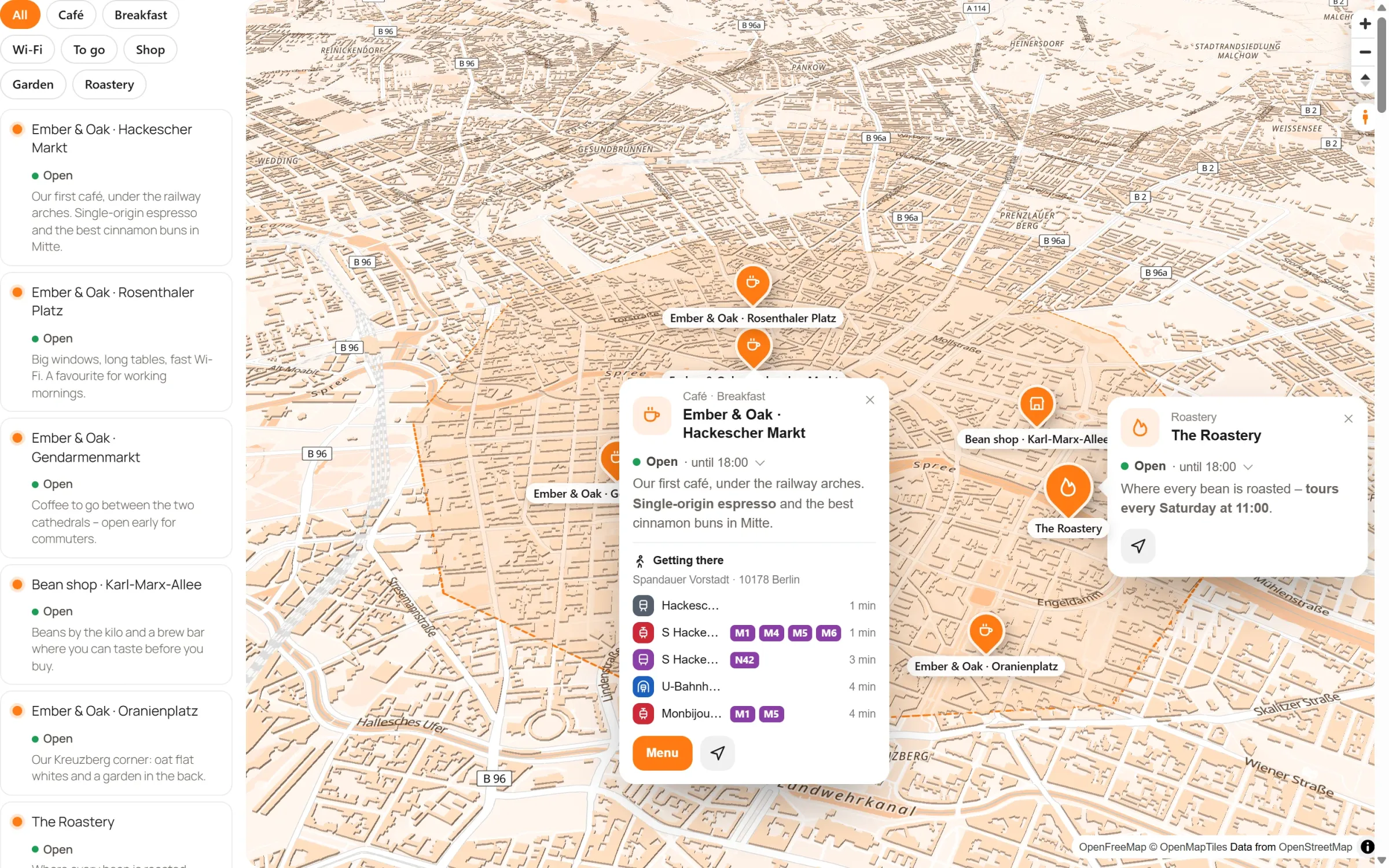
- Try Map Studio if your stores should sit on a map in your own look, with 3D buildings, areas and routes, and you want to design it right on the map. Your stores come over in one click with their opening hours, and your pages keep working.
What WP Store Locator does well
According to its plugin page, the free version (as of November 2026) offers:
- OpenStreetMap without an API key out of the box, or Google Maps, Mapbox or Stadia Maps with one setting;
- search by address, postcode, town or store name, with radius, maximum results and category filters;
- a page of its own for every location, with a clean URL;
- opening hours with an “Open now” badge, special hours for holidays and temporary closures;
- your own fields, a section editor for results and info windows, and a marker studio;
- shapes for service areas, a consent placeholder and integrations with Borlabs Cookie and Complianz.
Paid add-ons, bought once, add a CSV import and export, a search widget and statistics on what visitors search for. With over 40,000 active installs and a 4.8 rating on WordPress.org, it is one of the best rated store locators.
Where Map Studio is different
| WP Store Locator (free, per plugin page) | Map Studio (free) | |
|---|---|---|
| Made for | A store locator page | Maps of all kinds; the store finder is one template |
| Editing | Stores as posts with a form, plus settings pages | Full-screen editor: click a place and change it right on the map |
| Maps | OpenStreetMap (Leaflet), Google Maps, Mapbox, Stadia Maps | OpenStreetMap as vector maps: rotate, tilt, 3D buildings, light and sky |
| Search | Address, postcode or town with a radius and a maximum number of results | “Near me” from the visitor’s location or a town or postcode they type; the list sorts by distance; search by name in the list |
| Opening hours | “Open now” badge, special hours, closures | “Open now” in the list and the week in the popup |
| Popups | Info window and results shaped in the section editor | Text, photos, opening hours and buttons, designed on the map |
| Areas and routes | Polygons, circles, rectangles and lines | Areas with their size and routes along real roads by car, bike or on foot |
| Bulk import | CSV Manager (paid add-on) | Import from CSV, KML or GeoJSON, free |
| Privacy | Consent placeholder, Borlabs Cookie, Complianz | Load after click, works with Complianz, Borlabs Cookie and Real Cookie Banner |
| Switching | – | Makes one store finder of your stores in one click; the [wpsl] shortcode and block then show it |
The WP Store Locator column is based on its WordPress.org page as of 11 November 2026. Features change; check the plugin page for the current state.
Where WP Store Locator is the better choice
- A real radius search: visitors type an address and get the stores within, say, 25 km, with a limit on results. Map Studio’s “Near me” sorts the list by distance but has no radius.
- A page for every location: each store gets its own URL that search engines can find. In Map Studio, a place lives on its map.
- Your own fields and languages: custom fields of any type, WPML and Polylang, and statistics on searches (add-on).
Free-text opening hours, special hours, your own fields and own marker pictures don’t come over. Map Studio is new. We think it is the nicer way to make a map, but WP Store Locator has been around since 2013. For the bigger picture, see store locators for WordPress.
Switching to Map Studio
- Install Map Studio next to WP Store Locator; both can stay active while you switch.
- Open Map Studio → Maps: it finds your stores and shows how many places, areas and lines come along and which pages use the store locator. Bring it over in one click. All stores become one store finder with the list beside the map and “Near me”: address, phone, e-mail, website, picture, opening hours and categories come along, and so do the shapes you drew.
- Give the store finder your look: style, colours, icons, popups.
- Deactivate WP Store Locator. Your pages need no changes: the
[wpsl]shortcode and the store locator block now show the new store finder. Activate it again, and everything is as before.
One thing to plan for: the location pages belong to WP Store Locator and go away when you deactivate it. If search engines already know them, redirect them to the page with your store finder.
Try Map Studio – free
Install it next to your current plugin and compare. No account, no API key.