
Elementor map with your own markers – without Google
Elementor comes with a Google Maps widget. It is fine for one address. As soon as you want several places, your own markers, popups or your own look, it reaches its limits. Here is a way that goes further.
- Elementor’s Google Maps widget shows one address as an embedded Google map.
- For several places, your own markers, popups, a list or your own look, you need a map plugin with an Elementor widget.
- Map Studio has one: design the map in Map Studio, drag the “Map Studio” widget onto the page, choose the map.
Elementor’s Google Maps widget
In Elementor you drag the “Google Maps” widget onto the page and type an address. That is quick, but it has limits:
- One place: a single address, without markers of your own, a list or categories.
- No look of your own: the map looks like everywhere else.
- Privacy: the map loads from Google, and visitors’ IP addresses go to Google. In the EU this usually needs consent. More: Google Maps and the GDPR.
A map with Map Studio in Elementor
- Install Map Studio: in WordPress, go to Plugins → Add New, search for “Devenzi Map Studio” and activate it. No account, no API key.
- Design the map: Map Studio → New map. Add places, pick icons and colours, popups with text, photos and opening hours, and if you like areas, routes and a list. How it works: Interactive map maker.
- Add it in Elementor: edit the page with Elementor, drag the “Map Studio” widget onto it and choose your map in the widget. Set the height right in the widget.
- Done: the map shows live in the Elementor editor. A button in the widget opens it in Map Studio when you want to change something.
Because the map is saved in Map Studio, you can use it on several pages. Change it once and it changes everywhere.
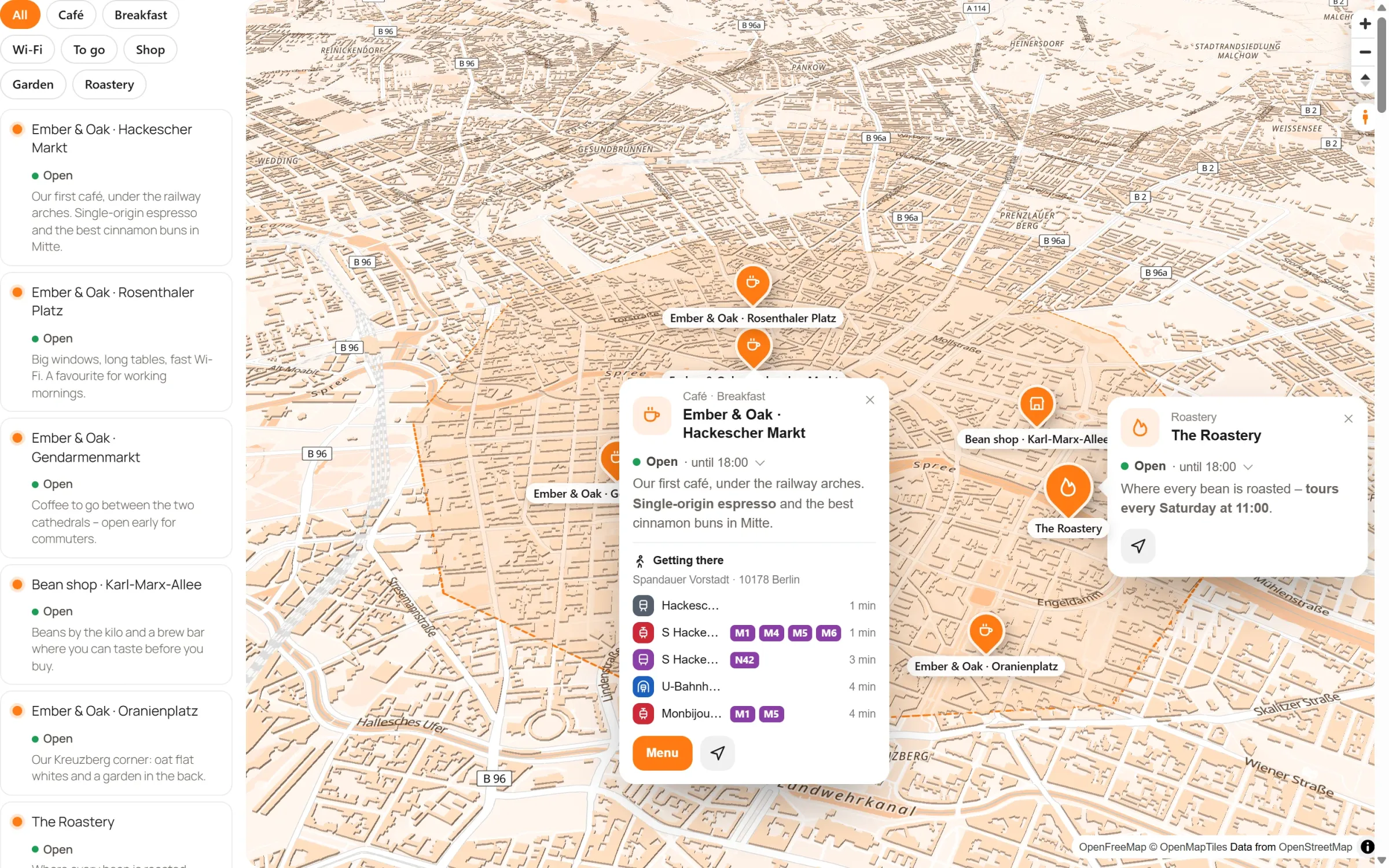
Elementor widget vs. Map Studio
| Elementor’s Google Maps widget | Map Studio | |
|---|---|---|
| Places | one address | as many as you like, with icons and colours |
| Popups | no | text, photos, opening hours, buttons |
| List, search, “Near me” | no | yes |
| Areas and routes | no | yes |
| Your own look | no | map styles, brand colour, 3D |
| Data to Google | yes | no (OpenStreetMap via OpenFreeMap) |
| Load after consent | through your consent tool | built in |
Frequently asked questions
Do I need Elementor Pro?
No. The “Map Studio” widget works with the free Elementor.
What about Divi, Bricks or other builders?
Wherever shortcodes work, use [devenzi_map id="…"]. Change the height with height, for example [devenzi_map id="12" height="400"]. In the block editor there is the “Map Studio” block.
Does the map slow down the page?
Map Studio loads the map only when it scrolls into view, and if you like only after a click.
What does it cost?
Map Studio is free. The Pro version adds extras such as your own map data on your server, satellite imagery and street-level imagery.
Your map in Elementor – free
Get Map Studio from WordPress.org, design your map and add it to the page with the widget.