
Google Maps and the GDPR in WordPress – or a map without Google
A map on the contact page is almost standard. With Google Maps, though, comes a privacy question, especially in the EU. Here is what happens, which solutions exist and how a map can do without Google entirely.
- An embedded Google map loads data from Google’s servers. Among other things, the visitor’s IP address goes to Google.
- That is why most websites in the EU ask for permission first: with a consent tool or a two-click solution.
- An OpenStreetMap map also loads from someone else’s server, just not Google’s. Only map data served from your own website avoids a third-party server altogether.
What happens when you embed Google Maps?
Whether you use the iframe from “Share → Embed a map” or a plugin with the Maps API: as soon as the page loads, the visitor’s browser fetches map images, fonts and scripts from Google. Technically, Google learns the IP address, plus details such as the browser and the page the map is on. Google is a US company.
That is why data protection authorities in the EU, and most websites in practice, treat a Google map as something that needs consent. The map may only load once visitors have agreed.
This guide explains the technology and the usual solutions. It is not legal advice. Only a lawyer can tell you what applies to your website.
The three usual solutions
1. Google Maps behind the cookie banner
Tools such as Complianz, Borlabs Cookie or Real Cookie Banner block the map until visitors have agreed. That works, but has a weak spot: visitors who dismiss the banner see a grey box instead of your directions. On a contact or store page, that is exactly the wrong place.
2. Two-click solution
Instead of the map, there is a placeholder with a note and a “Load map” button. Only the click loads the map. Visitors understand this better than a banner, because the question comes up where the map is needed.
3. A map without Google
OpenStreetMap is a free map of the world maintained by millions of volunteers. If you use it, no data goes to Google. A tile server is still involved, because the map images have to come from somewhere. So again: either ask first (two-click), or serve the map data from your own server.
| Solution | Data goes to | Consent needed? | Effort |
|---|---|---|---|
| Google Maps directly | Google (USA) | In practice, yes | Low, but the map only loads after consent |
| Google Maps + two-click | Google, only after the click | Yes, the click is the consent | A plugin or consent tool |
| OpenStreetMap + two-click | Tile server (e.g. OpenFreeMap), only after the click | Yes, the click is the consent | One plugin |
| OpenStreetMap from your own server | Nobody but your website | No third-party transfer for the map itself | Load the map data to your server once |
How Map Studio handles it
Map Studio is our free WordPress plugin for OpenStreetMap maps. Privacy was part of the plan from the start:
- No Google, no API key, no account. The map comes from OpenFreeMap, the map data from OpenStreetMap.
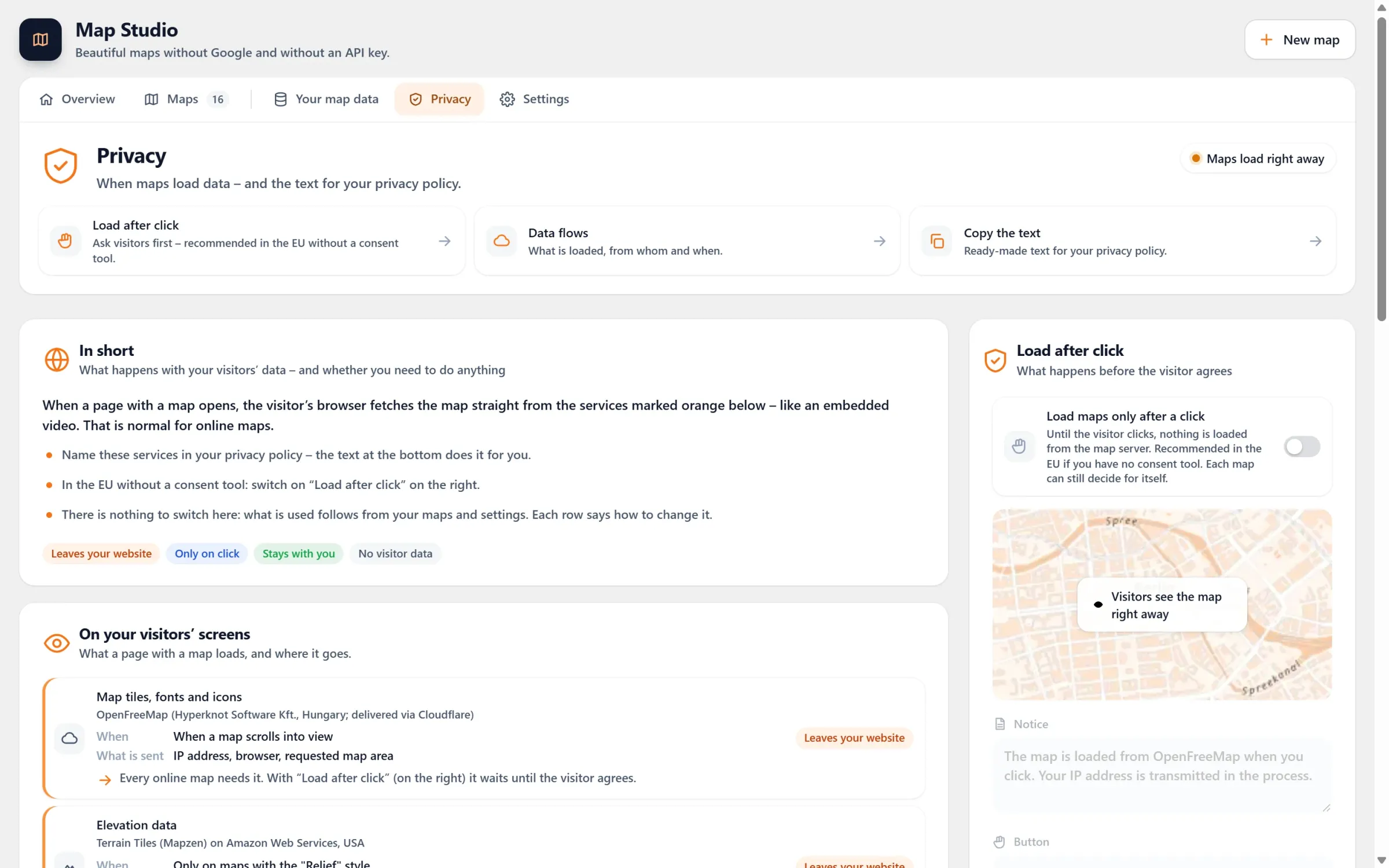
- Load after click (free): no map server is contacted until visitors click “Load map”. You write the note yourself. One click counts for all maps on your site, without a cookie: the choice stays in the browser’s local storage.
- Works with your consent tool: Map Studio asks Complianz, Borlabs Cookie 3 and Real Cookie Banner through their interfaces. Visitors who already agreed there see the map right away.
- Withdraw with one button: the shortcode
[devenzi_map_consent]puts a withdraw button on your privacy page. - Text for your privacy policy: Map Studio → Privacy shows what loads when, and gives you a paragraph to copy and adapt.
- Your own map data (Pro): the map of your region lives on your own server. No other server is asked, and there is nothing for visitors to agree to.
Step by step: a map without Google, with two-click
- In WordPress, go to Plugins → Add New, search for “Devenzi Map Studio” and activate it.
- Open Map Studio, pick a template (for example “Store finder”) or start empty, and type your address.
- Under Map Studio → Privacy, switch on “Load maps only after a click”, or add a service for the map in your consent tool.
- Copy the privacy text, adapt it, add it to your privacy policy along with
[devenzi_map_consent]. - Add the map to your page with the block, the Elementor widget or a shortcode.
Frequently asked questions
Is a Google map as an image enough?
A static screenshot with a link to Google Maps transfers nothing until someone clicks. Mind Google’s terms for map images. Such a picture is not interactive, of course. Visitors can’t zoom, and there are no markers or list.
Is OpenStreetMap automatically GDPR-compliant?
No. With OpenStreetMap too, the browser loads map tiles from a server, and that server sees the IP address. No data goes to Google, though. Only map data served from your own website avoids a third-party server altogether.
Do I need an API key?
For Google Maps with your own markers you need the Maps API with a key and a billing account. Map Studio works without a key, an account or a credit card. See Google Maps API alternatives.
What does Map Studio cost?
The plugin is free on WordPress.org. Load after click, the consent tool support and the privacy text are included. The Pro version adds, among other things, your own map data on your server.
A map without Google – free
Map Studio is on WordPress.org. Install it, open it and design your map; you need neither an account nor an API key.