
Interactive map maker for your website
A map people can zoom into, with your places, popups, delivery areas or hiking routes. Below you find the tools for making one and a step-by-step guide for building it in WordPress.
- Without a website of your own, Google My Maps or uMap (based on OpenStreetMap) are enough for a map to share.
- For your WordPress site: a map plugin, so the map belongs to your site and matches your design.
- With Map Studio you design the map right on the map, free and without an API key.
What makes a map interactive
- Zoom and pan instead of a fixed picture.
- Your own places with an icon and a colour that people can click.
- Popups with text, photos, opening hours and a button for directions.
- Areas and lines: delivery area, catchment area, festival grounds, hiking route.
- A list with search and filters, so people find what they need without the map too.
Which tool for what?
| Tool | Good for | Limits |
|---|---|---|
| Google My Maps | A quick map with points and lines to share | Google account, little control over the look, data to Google when embedded |
| uMap | Free OpenStreetMap maps in the browser, to share and embed | Runs on someone else’s servers, embedded as an iframe |
| Map Studio (WordPress) | Maps that belong to your site: your look, a list, a store finder, privacy options | WordPress only |
Step by step in WordPress
- Install Map Studio. In WordPress, go to Plugins → Add New, search for “Devenzi Map Studio” and activate it. You need no account and no key.
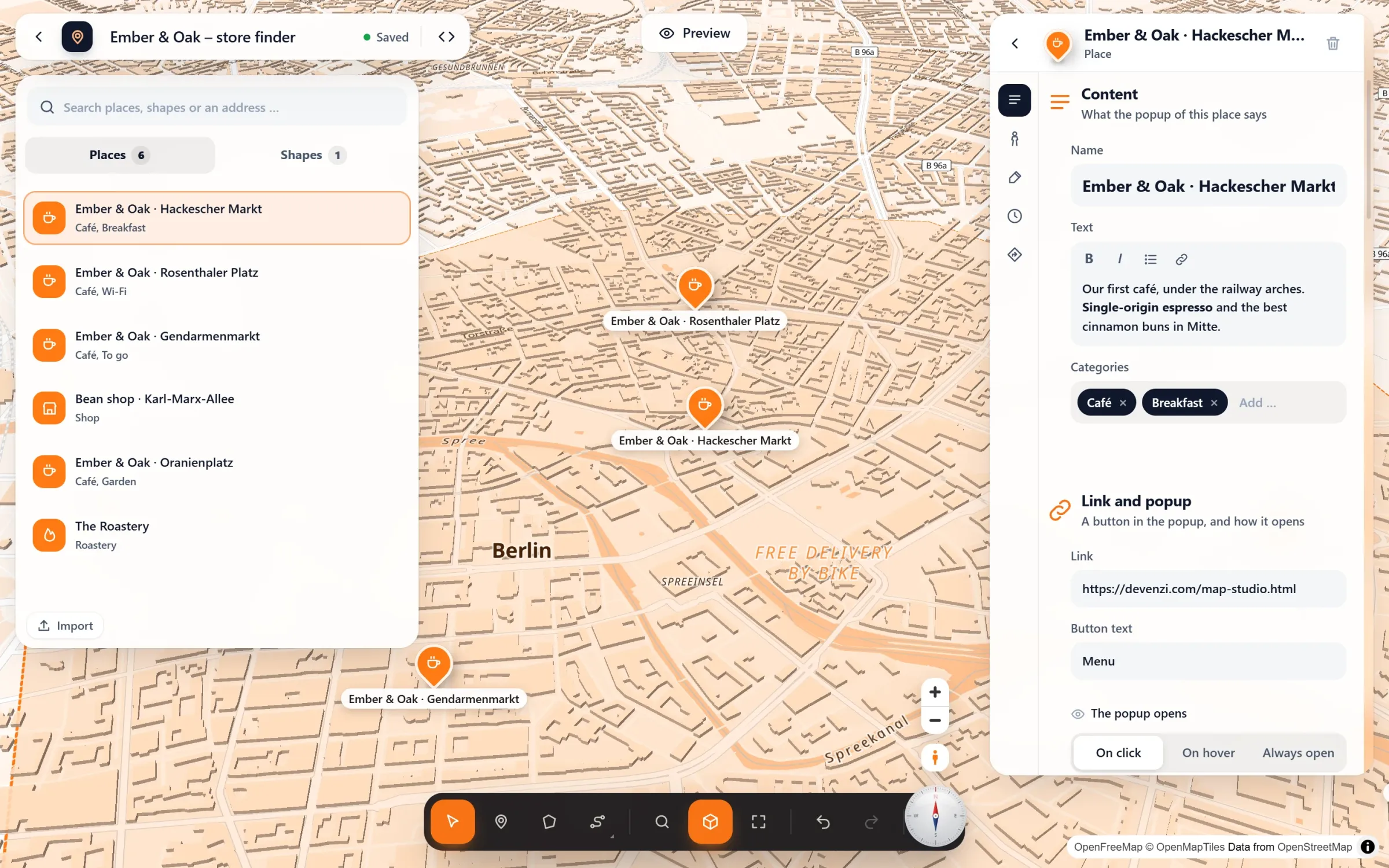
- Create a map. Map Studio → New map. Start empty or from a template: store finder, delivery area, hiking route or event site plan.
- Add places. Type an address (with suggestions as you type), click on the map, or import a spreadsheet. Click a café or a stop on the map itself, and one click turns it into a place with a fitting icon.
- Design. 66 icons, your own colours, pin shapes and popups that open on click, on hover or always. Add photos, text and opening hours.
- Draw areas and routes. Draw an area like in Google Maps, with its size and perimeter. Routes can follow real roads and paths, on foot, by bike or by car.
- Pick a look. Choose one of six map styles and your brand colour. When the map is tilted, 3D buildings appear.
- Add it to your site. With the block, the Elementor widget or a shortcode. Change the map later and it changes everywhere it is used.
Ideas for interactive maps
- Directions to your practice, office or shop, with parking and stops.
- A store locator with a list, search and “Near me”.
- A delivery area of a restaurant or trade business, drawn as an area.
- A hiking route or city walk with stops.
- A site plan for a festival, a fair or a campus.
- A project map with references, properties or venues.
Frequently asked questions
Is it really free?
Yes. Map Studio and the OpenFreeMap tile service cost nothing, with no API key and no account. The Pro version adds extras such as your own map data on your server, GPX routes with an elevation profile and story maps.
Can I use it without WordPress?
Map Studio is a WordPress plugin. Without WordPress, Google My Maps or uMap are simple ways to make a map and embed it as an iframe. See How to add a map to your website.
Does the map work on phones?
Yes. The map adapts to the width, popups stay on screen, and the list of places sits next to or below the map. The editor’s preview shows computer, tablet and phone.
What about privacy?
The map tiles come from OpenFreeMap; nothing goes to Google. Without a consent tool, switch on load after click. More in Google Maps and the GDPR.
Your interactive map – free
Map Studio on WordPress.org: install, open, design. No account, no API key.