
Snazzy Maps alternative – styled maps without Google
Snazzy Maps made it easy to give a Google map a look of its own. The catch: underneath it is still Google Maps, with an API key, a billing account and the privacy question. This guide shows how to get a styled map in your colours without Google.
- Snazzy Maps styles are colour styles for Google Maps. You still need the Maps JavaScript API, a key and billing.
- The alternative: OpenStreetMap vector maps with a style of your choice. No Google, and depending on the tile service no key.
- In WordPress, Map Studio has six map styles and recolours the whole map in your brand colour, for free.
Why look beyond Snazzy Maps
- Still Google underneath: a key, a billing account and costs beyond Google’s free allowance. See Google Maps API alternatives.
- Privacy: the map loads from Google, so in the EU it usually needs consent first. See Google Maps and the GDPR.
- Only the colours change: it is still Google’s map, and custom icons, popups or a list of places mean extra code or another plugin.
Styled maps with OpenStreetMap
OpenStreetMap vector maps are drawn in the browser from a style file, so the whole look is open: colours, which details show, labels, buildings. Open styles exist for every taste, and tools like Map Studio let you pick and recolour them without touching a style file.
In WordPress with Map Studio
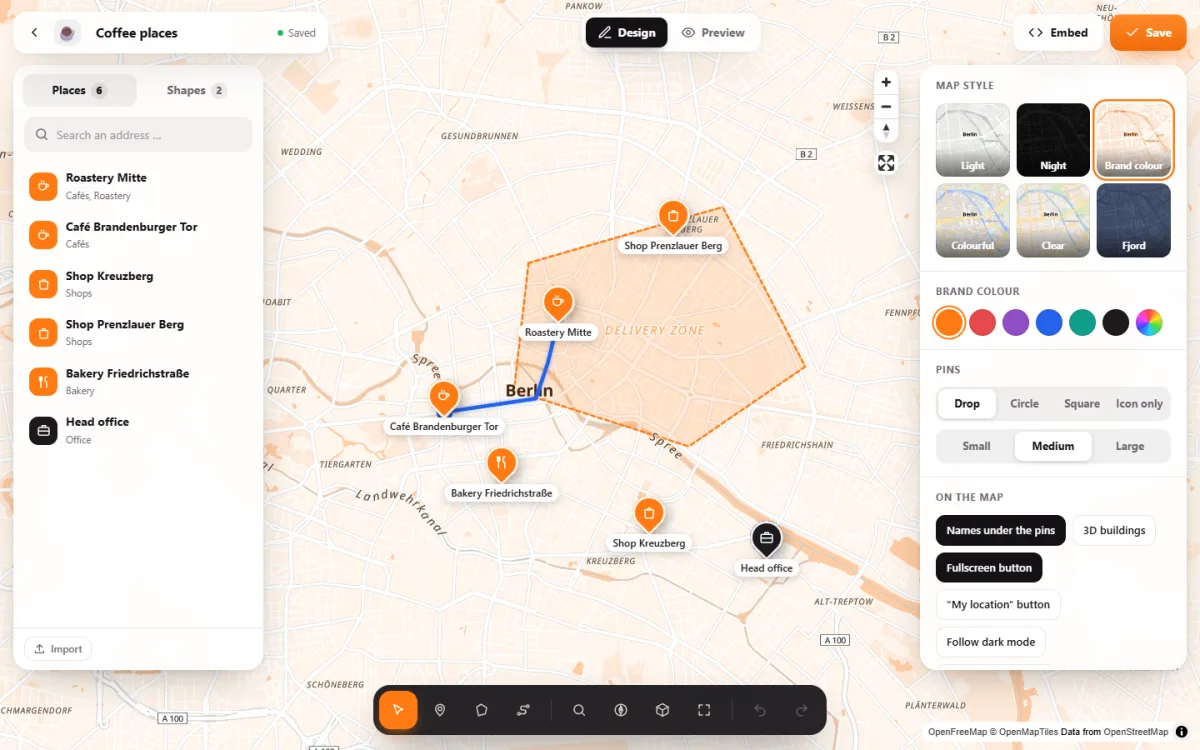
- Six map styles as preview tiles: light, night, colourful, clear, fjord and “Brand colour”, which recolours the whole map from one colour.
- Pins, areas and buttons follow your colour, unless you give them their own. Colours you pick are kept for your next maps.
- 66 icons, pin shapes and sizes, popups with photos and text.
- 3D buildings and light and sky: day, morning, evening, night, or the sun as it stands right now.
- A night style for visitors in dark mode, if you switch it on.
- Works without Google, a key or an account. The tiles come from OpenFreeMap and the data from OpenStreetMap.
Frequently asked questions
Can I import a Snazzy Maps style?
No. Snazzy Maps styles are written for Google Maps and do not apply to OpenStreetMap vector maps. In Map Studio you pick a style and a colour instead. For most sites, that is enough to get the look they want.
Can I match my brand colour exactly?
Yes. Choose “Brand colour” and enter your colour: the whole map is recoloured from it, and pins, areas and buttons follow.
Is it free?
Yes. All six styles and the brand colour are part of the free version on WordPress.org. Pro adds the relief style with shaded hills and satellite imagery.
A map in your colours – free
Map Studio on WordPress.org: install, pick a style, set your colour.