
Event map maker – festival, fair and venue maps for your website
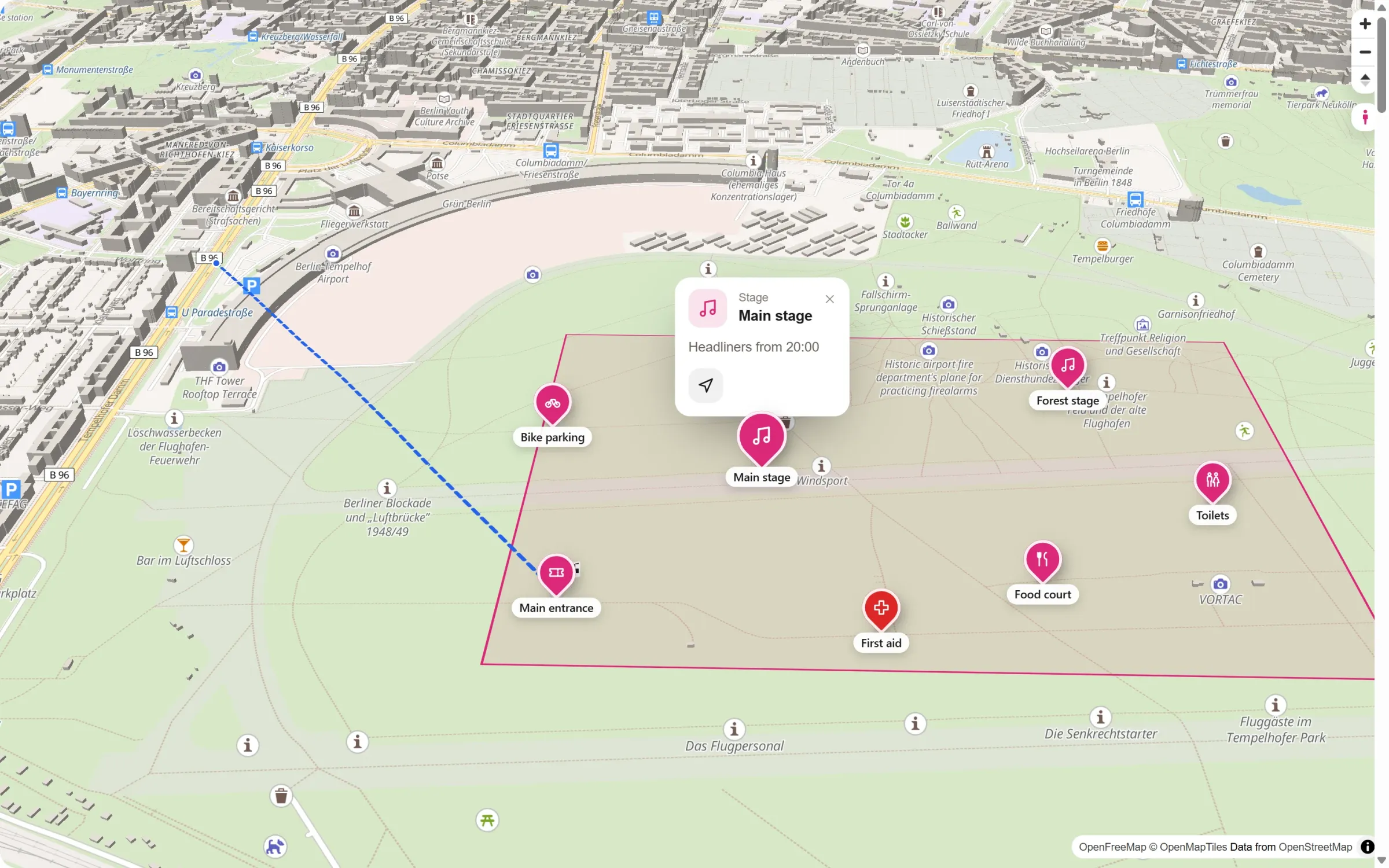
Where is the main stage, where do I get in, where is first aid? An event map answers this before your guests arrive. Here is how to make one on a real map, with the way from the station, and put it on your event page.
- A good event map shows the grounds, the important places (stages, entrances, food, toilets, first aid) and how to get there.
- A drawn plan as a picture is quick, but guests can’t zoom, and it doesn’t show the way from the station.
- On a real, interactive map you get both. In WordPress, Map Studio has an “event site plan” template for it, free.
What belongs on an event map
- The grounds as an outlined area, so everyone sees where the event is.
- Stages and programme spots with a popup: what happens there, and when.
- Entrances and exits, ticket booths, bike parking and car parks.
- Food, drinks, toilets, first aid and information.
- The way there: from the nearest station or car park to the entrance.
Picture or interactive map?
| Drawn plan as an image | Interactive map | |
|---|---|---|
| Look | fully your design | a map style and your colours |
| Zoom on a phone | only by pinching the picture | yes, sharp at every zoom level |
| Surroundings and the way there | usually missing | streets, stations and the route are part of the map |
| Details per place | printed on the plan | popups with text, photos and times |
| Changes | redraw and export again | move a pin, save, done |
Many events use both: a drawn plan for the programme booklet, and an interactive map on the website.
Step by step with Map Studio
- Install: in WordPress, go to Plugins → Add New, search for “Devenzi Map Studio” and activate it. No account, no API key.
- Start from the template: Map Studio → New map → event site plan.
- Draw the grounds as an area, in your event colour.
- Set the places: stages, entrance, food court, toilets, first aid. Pick from 66 icons and give each place its own colour, so first aid stands out in red.
- Write the popups: “Headliners from 20:00”, a photo, a button to the programme.
- Draw the way there: a line from the station or car park to the entrance, or a route along real paths.
- Add it to your event page with the block, the Elementor widget or a shortcode.
Ideas
- Festivals and open-air concerts: stages, camping, water points, lockers.
- Fairs and markets: halls or stalls, food, toilets, car parks.
- Conferences and campuses: buildings, rooms, registration, the way from the hotel.
- Weddings: ceremony, reception, hotel and parking, for guests who don’t know the area.
- Runs and parades: the course as a route, with start, finish and refreshment points.
Frequently asked questions
Is it free?
Yes. The template, areas, places with icons, popups and lines are all in the free version of Map Studio on WordPress.org. No account, no API key.
Can I show the map in 3D?
Yes. Tilt the map and buildings rise in 3D; set the view you want visitors to see first.
Does it work on phones?
Yes. The map adapts to the width and popups stay on screen. In the editor you can preview it on computer, tablet and phone.
Can I reuse the map next year?
Yes. The map is saved in Map Studio; move the pins, update the popups and it changes everywhere it is used.
Your event map – free
Install Map Studio from WordPress.org, then start from the event site plan template and set your places.