
OpenStreetMap in WordPress: three ways compared
OpenStreetMap is the open alternative to Google Maps. It covers the whole world and is kept up to date, without Google. In WordPress there are three ways to put such a map on a page. Here is what each one can do and who it suits.
- Just show one address: the iframe from openstreetmap.org is enough, but it can hardly be styled.
- Build maps with shortcodes: Leaflet plugins are flexible and proven; you configure them with shortcodes and settings pages.
- Design maps like in a design tool: a map editor like Map Studio, with vector maps, 3D and your own look.
What is OpenStreetMap?
OpenStreetMap (OSM) is a map of the world kept up to date by millions of volunteers, a bit like Wikipedia. The data is free to use; the only obligation is the attribution “© OpenStreetMap contributors”. Many navigation apps and companies use OSM data, and in many countries it is more detailed than commercial maps, especially for footpaths, cycle paths and house numbers.
Worth knowing: OSM provides the data. The map images (tiles) visitors see come from a tile service. Whoever runs that service decides about the look, speed, terms of use and privacy.
Way 1: The iframe from openstreetmap.org
On openstreetmap.org, find the spot, click Share on the right and copy the HTML. In WordPress, paste it into a Custom HTML block.
- Good: it is free, needs no plugin and takes two minutes.
- Limits: a single marker and no look of your own. There is no list, and popups with text or images are not possible.
- Mind: the openstreetmap.org tile servers are paid for by donations, and their usage policy limits how much other websites may use them. For a small contact page that is rarely an issue; for a busy site it is. And the map loads right away, without asking first.
Way 2: A Leaflet plugin
Leaflet is a proven JavaScript library for maps. Several WordPress plugins build on it, for example “Leaflet Map” or “OSM”. They handle several markers, shapes, GPX tracks and different tile services.
- Good: free and flexible, with a wide choice of tile services and extensions.
- Limits: you usually configure them with shortcodes and settings pages, not on the map itself. The maps are mostly raster images: sharp only at fixed zoom levels, without 3D or rotation.
Way 3: A map editor (Map Studio)
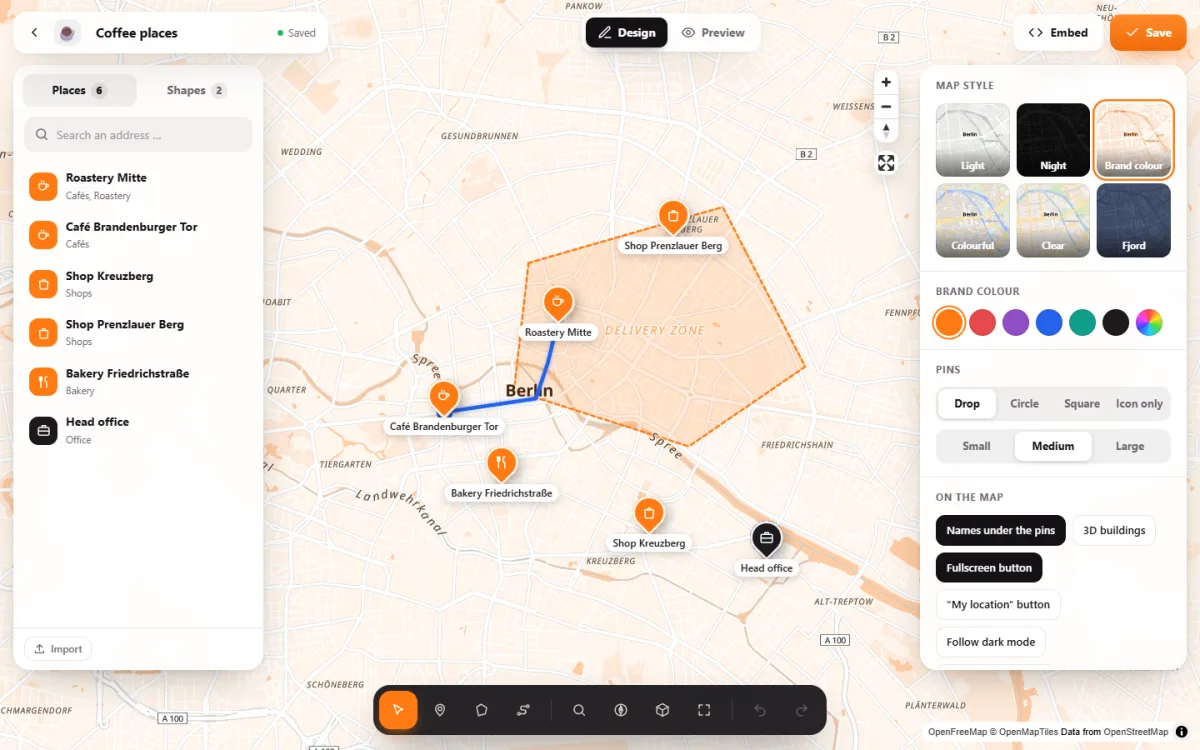
Map Studio is our free plugin. Instead of filling in forms, you design the map directly: the map fills the screen, your places are on the left, the look on the right.
- Vector maps: sharp on every screen, with smooth zoom, rotating and tilting, 3D buildings and light and sky down to the sun as it stands right now.
- Your own look: six map styles and your brand colour for map, pins and areas.
- Places with content: 66 icons, photos, formatted text, opening hours, popups.
- More than points: areas such as delivery zones and routes along real roads and paths.
- No key, no account: the tiles come from OpenFreeMap, which is made for websites and has no usage limits for normal sites.
- Privacy: load after click and support for consent tools are built in. With Pro, the map data comes from your own server.
All three at a glance
| iframe from osm.org | Leaflet plugin | Map Studio | |
|---|---|---|---|
| Cost | free | free | free (Pro optional) |
| Several places | no | yes | yes, with list, search and filter |
| Editing | copy code | shortcodes, settings | editor right on the map |
| Map type | raster images | raster images | vector map, 3D |
| Your own look | no | by choosing the tile service | styles and brand colour |
| Load after consent | build it yourself | depends on the plugin | built in |
Moving from Google Maps
Already have your places in Google My Maps? Export the map as KML and import it into Map Studio. If your addresses are in a spreadsheet, use CSV: Map Studio finds the coordinates for the addresses itself.
Frequently asked questions
Is OpenStreetMap free?
The data is free to use (ODbL licence) with the attribution “© OpenStreetMap contributors”; Map Studio adds it automatically. The terms of the tile service apply to the map images as well.
Do I need an API key?
Not for the iframe or for Map Studio. With Leaflet plugins it depends on the tile service you pick: some need a key, others don’t.
Is an OpenStreetMap map GDPR-compliant?
No data goes to Google, but the tile server still sees visitors’ IP addresses. More in Google Maps and the GDPR.
Does it work with Elementor and my theme?
Map Studio comes with a block, an Elementor widget and a shortcode, so it also works with Divi and classic themes.
OpenStreetMap, beautifully designed – free
Map Studio on WordPress.org: install, open, design. No account, no API key.